HubSpot CRM for Sales Teams: Complete 2026 Guide & Review
HubSpot CRM has become one of the most popular CRM platforms, particularly for growing companies. With a genuinely useful free tier and seamless integration between marketing, sales, and service, it's an attractive choice for teams wanting an all-in-one ecosystem.
But is HubSpot right for your sales team? In this comprehensive review, we'll cover everything you need to know to make an informed decision.
Quick Verdict
Best for: Growing teams wanting marketing + sales alignment with a clear upgrade path
Starting price: Free (unlimited users) → $15/user/mo (Starter)
Our rating: 9.0/10
What is HubSpot CRM?
HubSpot CRM is a customer relationship management platform that serves as the foundation of HubSpot's broader ecosystem. Unlike traditional CRMs that focus solely on sales, HubSpot provides integrated hubs for Marketing, Sales, Service, CMS, and Operations—all working from the same database.
Founded in 2006, HubSpot pioneered the concept of "inbound marketing" and has since expanded into a comprehensive platform used by over 200,000 companies worldwide.
HubSpot CRM Key Features
Contact & Company Management
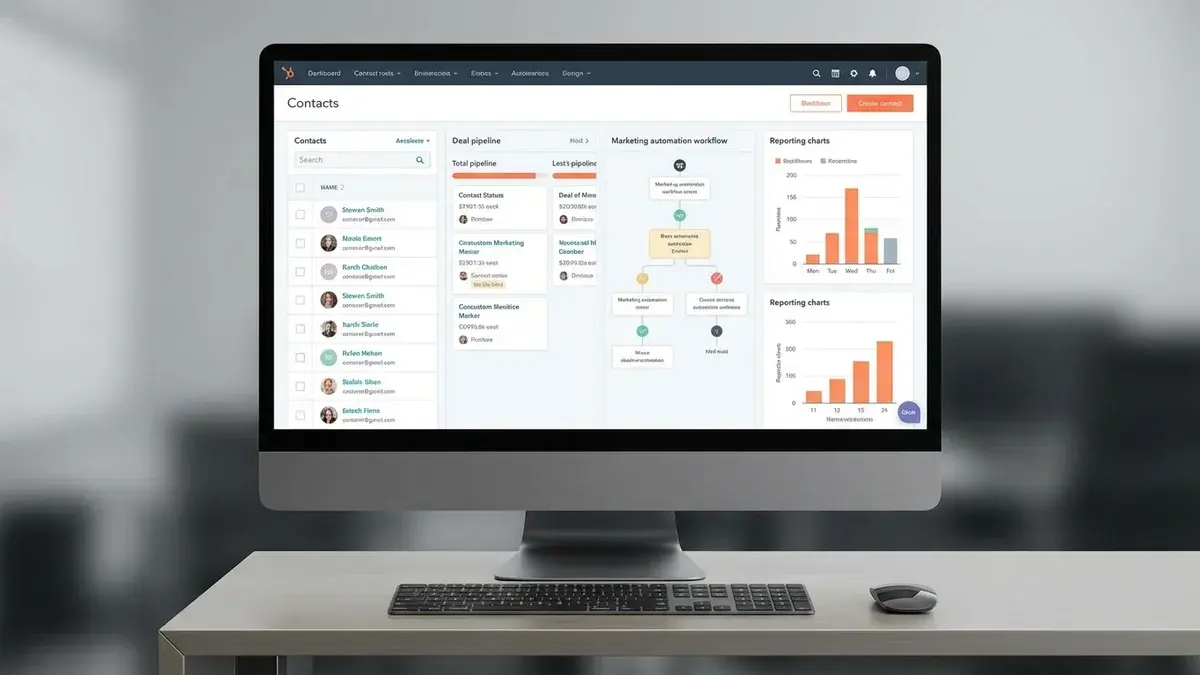
HubSpot automatically enriches contact records with publicly available data—company size, industry, social profiles, and more. The timeline view shows every interaction (emails, calls, meetings, page visits) in chronological order.
Pipeline Management
Visual deal pipelines with drag-and-drop functionality. Create multiple pipelines for different products or sales processes. The free tier includes one pipeline; paid plans allow unlimited.
Email Tracking & Templates
Track email opens and clicks in real-time. Create templates for common messages and share them across your team. The Sequences feature automates multi-touch email campaigns.
Meeting Scheduling
Built-in meeting scheduler eliminates the back-and-forth. Share your calendar link, and prospects book directly. Meetings sync to your calendar and create activities in the CRM automatically.
AI Features (2025 Updates)
HubSpot's AI features have expanded significantly:
- AI Agents: Autonomous agents that can research prospects and draft personalized outreach
- Content Assistant: Generate email copy, blog posts, and social content
- Conversation Intelligence: Analyze call recordings for coaching insights
- Predictive Lead Scoring: AI-powered scoring based on fit and engagement
Reporting & Dashboards
Customizable dashboards with drag-and-drop widgets. Pre-built reports for common metrics (pipeline velocity, deal forecast, rep performance). Custom report builder available on Professional plans and above.
HubSpot CRM Pricing (2026)
| Plan | Price | Key Features |
|---|---|---|
| Free CRM | $0 | Contact management, 1 pipeline, email tracking, meeting scheduling, basic reporting |
| Sales Hub Starter | $15/user/mo | Multiple pipelines, quotes, goals, simple automation, remove HubSpot branding |
| Sales Hub Professional | $90/user/mo | Sequences, forecasting, playbooks, custom reporting, 1:1 video messaging |
| Sales Hub Enterprise | $150/user/mo | Predictive lead scoring, conversation intelligence, custom objects, advanced permissions |
Important pricing notes:
- The jump from Starter ($15) to Professional ($90) is significant—6x more expensive
- Marketing contacts are billed separately from Sales Hub seats
- Many useful features (sequences, forecasting) require Professional tier
- Annual billing required for best rates
HubSpot CRM Pros & Cons
✅ Pros
- Exceptional free tier: Most generous free CRM on the market
- Intuitive interface: Minimal training needed to get started
- All-in-one ecosystem: Marketing, sales, service work together
- Strong inbound tools: Landing pages, forms, email marketing included
- Excellent documentation: HubSpot Academy provides free training
- 1,500+ integrations: Connects with most tools
- Clean, modern design: Pleasant to use daily
❌ Cons
- Expensive at scale: Professional tier costs add up quickly
- Feature gating: Key sales features locked behind higher tiers
- Contact pricing: Marketing contacts billed separately
- Less customizable: Not as flexible as Salesforce for complex needs
- Outbound limitations: Better for inbound than outbound motions
- Limited reporting (free/Starter): Custom reports need Professional
Who Should Use HubSpot CRM?
✅ Great Fit For:
- Startups: Start free and upgrade as you grow
- Inbound-focused teams: Content marketing, lead nurturing strengths
- Marketing-sales alignment: Both teams use the same data
- Non-technical users: No admin expertise required
- SMBs wanting ecosystem: One vendor for marketing + sales + service
❌ Not Ideal For:
- Heavy outbound teams: Better tools exist for cold outreach
- Complex enterprise needs: Salesforce offers more customization
- Budget-sensitive mid-market: Professional tier is expensive
- Highly regulated industries: May need more specialized solutions
The HubSpot Gap: What's Missing
HubSpot excels at organizing your sales process and providing visibility into your pipeline. But like most CRMs, it has a fundamental limitation: it tracks what happened, but doesn't help you win.
HubSpot tells you who to call and when they opened your email. It doesn't tell you:
- How to communicate based on each prospect's personality
- What to say when objections arise during calls
- Why your top reps close more than others
- How to adjust your pitch in real-time
How Appendment Enhances HubSpot
Appendment integrates with HubSpot to fill this gap:
- 50+ prospect data points: Psychographics, communication preferences, buying triggers beyond HubSpot's enrichment
- Real-time AI coaching: Get objection responses and talk tracks during calls—not just post-call analysis
- Personality-based selling: Understand how each contact prefers to communicate
- Automatic HubSpot sync: Call notes, insights, and action items update automatically
Teams using Appendment with HubSpot report 40-50% higher close rates. HubSpot organizes your pipeline; Appendment helps you win the deals in it.
HubSpot vs. Alternatives
See how HubSpot compares in our complete CRM comparison guide.
| Comparison | Choose HubSpot If... | Choose Alternative If... |
|---|---|---|
| vs. Salesforce | You want simplicity and marketing integration | You need deep customization and enterprise scale |
| vs. Pipedrive | You need marketing tools alongside CRM | You want pure sales focus and lower cost |
| vs. Zoho | You prefer better UX and onboarding | Budget is tight and you need more features |
Getting Started with HubSpot
- Start with Free CRM: Test the platform without commitment
- Import your contacts: Use HubSpot's import wizard
- Set up your pipeline: Customize deal stages for your process
- Connect your email: Enable tracking and logging
- Add integrations: Connect tools like Appendment for AI coaching
- Evaluate upgrade needs: Only upgrade when you hit free tier limits
Ready to maximize your HubSpot CRM?
Appendment integrates with HubSpot to deliver 50+ prospect data points plus real-time AI coaching. See how teams are closing 40-50% more deals. Book a demo