Google Workspace Sales Stack: The Complete 2026 Guide
Google Workspace powers over 3 billion users worldwide, and for sales teams, it offers a powerful foundation for communication, scheduling, and collaboration. But out of the box, it's just a productivity suite—not a sales system.
The difference between sales teams that struggle with Google Workspace and those that thrive? The integrations and workflows they build around it.
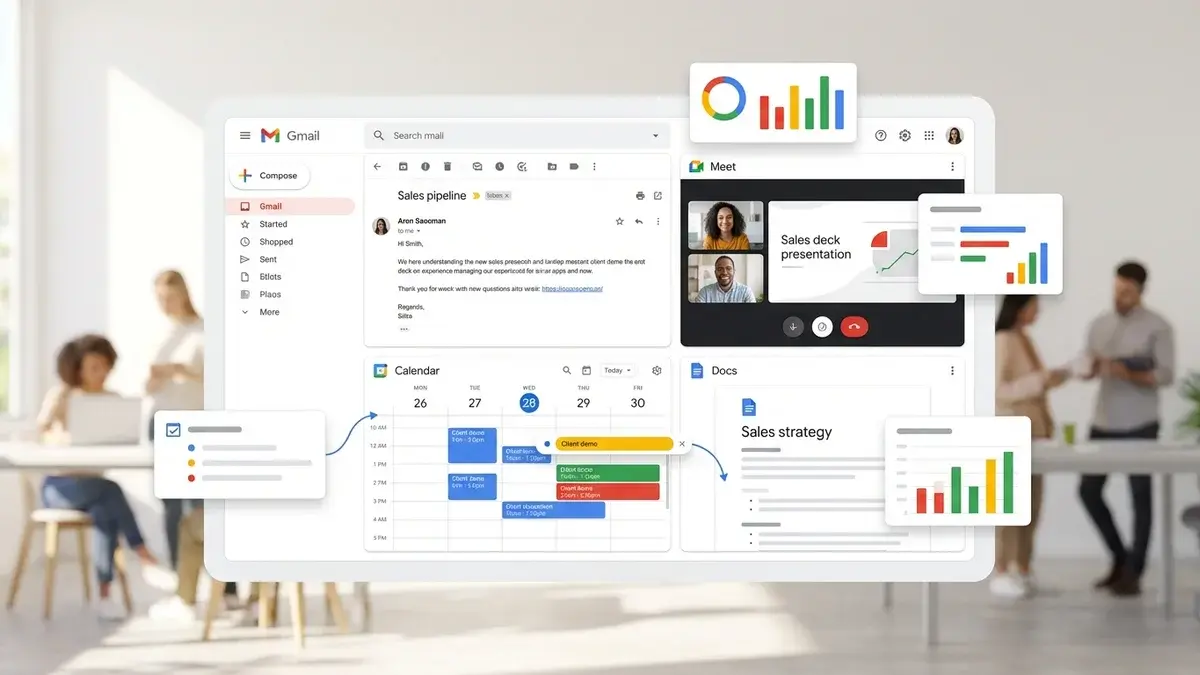
This guide shows you how to transform Google Workspace into a complete sales stack—connecting Gmail, Calendar, Meet, and Drive with CRM systems, AI coaching tools, and automation platforms that actually drive revenue.
If you're comparing platforms, check out our Zoom vs Teams vs Google Meet comparison for a detailed breakdown of each platform's sales capabilities.
Why Google Workspace for Sales?
Before diving into the stack, let's understand why many sales teams choose Google Workspace:
- Universal email platform - Gmail is where most B2B communication happens
- Seamless scheduling - Google Calendar integrates with every scheduling tool
- Browser-based everything - No downloads, works on any device
- Gemini AI built-in - Native AI for email drafting, meeting summaries, and more
- Cost-effective - Meet, Chat, and Drive included in one subscription
- Real-time collaboration - Docs, Sheets, and Slides for team selling
The challenge? Google Workspace lacks native sales-specific features. You need to build those through integrations.
The Complete Google Workspace Sales Stack
Layer 1: Core Google Workspace Apps
Start with the native apps and optimize them for sales:
Gmail for Sales Communication
- Templates - Create canned responses for common outreach and follow-ups
- Labels and filters - Auto-organize prospect emails by stage or priority
- Schedule send - Time emails for optimal open rates
- Confidential mode - For sensitive proposals and contracts
- Gemini AI - Draft emails, summarize threads, and suggest replies
Google Calendar for Meeting Management
- Appointment slots - Native scheduling (though Calendly is better)
- Working hours - Prevent prospects from booking outside availability
- Multiple calendars - Separate personal, internal, and prospect meetings
- Meet integration - Auto-add video links to every meeting
Google Meet for Video Sales Calls
- No download required - Lowest friction for prospects
- Recording to Drive - Automatic cloud storage of call recordings
- Live captions - Real-time transcription with translation
- Gemini note-taking - AI-generated meeting summaries and action items
For advanced Meet features and integrations, see our guide to video platforms for sales.
Google Drive for Sales Content
- Shared drives - Team access to proposals, decks, and case studies
- Link sharing - Track when prospects view documents
- Version history - Never lose proposal changes
- Offline access - Prepare for demos without internet
Layer 2: CRM Integration (Critical)
Google Workspace without CRM integration is just email and calendar. You need bidirectional sync between your CRM and Google apps.
Option 1: HubSpot + Google Workspace
HubSpot offers the deepest Google Workspace integration of any CRM:
- Gmail sidebar shows contact/deal info while composing emails
- Automatic email logging to contact records
- Calendar sync for meeting tracking
- Email templates accessible from Gmail
- Email tracking (opens, clicks) built into Gmail
For HubSpot-specific integrations beyond Google, see our Pipedrive productivity guide for comparison.
Option 2: Salesforce + Google Workspace
Salesforce connects to Google Workspace through the Salesforce Connector:
- Einstein Activity Capture syncs emails and calendar automatically
- Gmail integration panel shows Salesforce data in inbox
- Create and update records without leaving Gmail
- Calendar events sync to Salesforce activities
For more Salesforce optimization, check our Salesforce productivity tools guide.
Option 3: Pipedrive + Google Workspace
Pipedrive offers native Google integrations:
- Two-way email sync with Gmail
- Google Calendar integration for scheduling
- Google Meet links auto-added to activities
- Google Contacts sync
Option 4: Zoho CRM + Google Workspace
Zoho CRM integrates well with Google Workspace, especially if you're using other Zoho products. See our Zoho CRM extensions guide for the full setup.
Layer 3: Real-Time AI Coaching
This is where Google Workspace sales stacks often fall short. Gemini provides general AI assistance, but it doesn't coach you during sales calls.
Appendment fills this gap by integrating with Google Meet to provide:
- Live coaching prompts - Objection responses and talk track guidance during calls
- Prospect intelligence - 50+ data points visible while you talk
- Automatic CRM sync - Call notes flow to your CRM without manual entry
- Personality-based cues - Adjust your approach based on communication style
Teams using real-time coaching on Google Meet report 40-50% higher close rates. Learn more in our complete guide to real-time AI coaching.
Layer 4: Scheduling Automation
Google Calendar's native scheduling is basic. For sales teams, dedicated scheduling tools are essential:
Calendly
The most popular scheduling tool, with deep Google integration:
- Syncs with Google Calendar to show real-time availability
- Auto-adds Google Meet links to meetings
- Round-robin scheduling for sales teams
- Custom booking pages per meeting type
Chili Piper
Advanced scheduling with lead routing:
- Inbound lead qualification and routing
- Instant booking from form submissions
- Handoff scheduling between SDRs and AEs
- Google Calendar and Meet integration
Layer 5: Conversation Intelligence
For post-call analysis and team coaching, add conversation intelligence:
- Gong - Industry leader, full Google Meet support
- Fathom - Free tier, great for small teams
- Otter.ai - Transcription-focused with CRM sync
- Fireflies.ai - Budget-friendly alternative
These tools record, transcribe, and analyze Google Meet calls, surfacing insights about talk ratios, topics, and coaching opportunities.
Layer 6: Email Automation & Sequences
Gmail alone doesn't support sales sequences. Add:
- Outreach - Enterprise sales engagement with Gmail integration
- Salesloft - Multi-channel sequences including email
- Apollo - Prospecting + sequences in one platform
- Mixmax - Gmail-native sequences and tracking
- Yesware - Email tracking and templates for Gmail
Layer 7: Proposals & E-Signatures
Close deals faster with document automation:
- PandaDoc - Proposals, quotes, and e-signatures with Google Drive integration
- DocuSign - Industry-standard e-signatures
- Proposify - Proposal creation and tracking
- Google Docs + Add-ons - Basic proposals with signature add-ons
Recommended Google Workspace Sales Stacks
Starter Stack (Small Teams, Limited Budget)
| Function | Tool | Cost |
|---|---|---|
| Email & Calendar | Google Workspace | $12/user/mo |
| CRM | HubSpot Free | Free |
| Scheduling | Calendly Free | Free |
| Meeting Notes | Fathom Free | Free |
| Video Meetings | Google Meet | Included |
Total: ~$12/user/month
Growth Stack (Mid-Market Teams)
| Function | Tool | Cost |
|---|---|---|
| Email & Calendar | Google Workspace Business | $18/user/mo |
| CRM | HubSpot or Pipedrive | $45-90/user/mo |
| Real-Time Coaching | Appendment | Contact for pricing |
| Scheduling | Calendly Pro | $12/user/mo |
| Proposals | PandaDoc | $35/user/mo |
Enterprise Stack (Large Organizations)
| Function | Tool |
|---|---|
| Email & Calendar | Google Workspace Enterprise |
| CRM | Salesforce |
| Real-Time Coaching | Appendment |
| Conversation Intelligence | Gong |
| Sales Engagement | Outreach or Salesloft |
| Scheduling | Chili Piper |
| Revenue Intelligence | Clari |
Google Workspace vs. Microsoft 365 for Sales
If you're deciding between ecosystems, here's the quick comparison:
- Choose Google Workspace if: You prefer browser-based tools, value simplicity, use non-Microsoft CRM, or have a distributed team
- Choose Microsoft 365 if: You use Dynamics 365, need deep Office integration, or have enterprise IT requirements
For a detailed breakdown, see our Microsoft Teams apps for sales guide.
Common Google Workspace Sales Stack Mistakes
- No CRM integration - Using Gmail and Calendar without connecting to your CRM means lost data and manual entry
- Skipping real-time coaching - Gemini helps with email, but doesn't coach you during live sales calls
- Using basic scheduling - Google Calendar's appointment slots aren't robust enough for sales teams
- No email tracking - You need to know when prospects open emails and click links
- Manual follow-ups - Without sequences, follow-up falls through the cracks
The Bottom Line
Google Workspace is a solid foundation for sales teams, but it needs the right integrations to become a true sales stack. The essential additions:
- CRM integration - Connect every email and meeting to your system of record
- Real-time AI coaching - Add Appendment for live guidance during Google Meet calls
- Scheduling automation - Replace basic Calendar scheduling with Calendly
- Email tracking - Know when prospects engage with your messages
With these layers in place, Google Workspace becomes a powerful, cost-effective sales platform.
Ready to add real-time AI coaching to your Google Workspace stack?
Appendment integrates with Google Meet to provide live coaching prompts, prospect intelligence, and automatic CRM updates. Book a demo to see how teams are closing 40% more deals.